
Fleet Utilization in Industrial Logistics: How to Measure and Raise Trips per Vehicle per Day
Photo: Smurrayinchester, CC BY-SA 4.0, via Wikimedia Commons
When a plant falls behind on dispatch or raw material receipts, the first response is often to hire more trucks. Sometimes that is the right call. Often, though, the trucks already on the job are spending large parts of the day parked at a gate, standing in a weighbridge queue, or waiting for the next order. Raising the number of trips each vehicle completes is usually cheaper than adding vehicles, and it starts with measuring what each truck actually does in a day.
What fleet utilization means for a plant
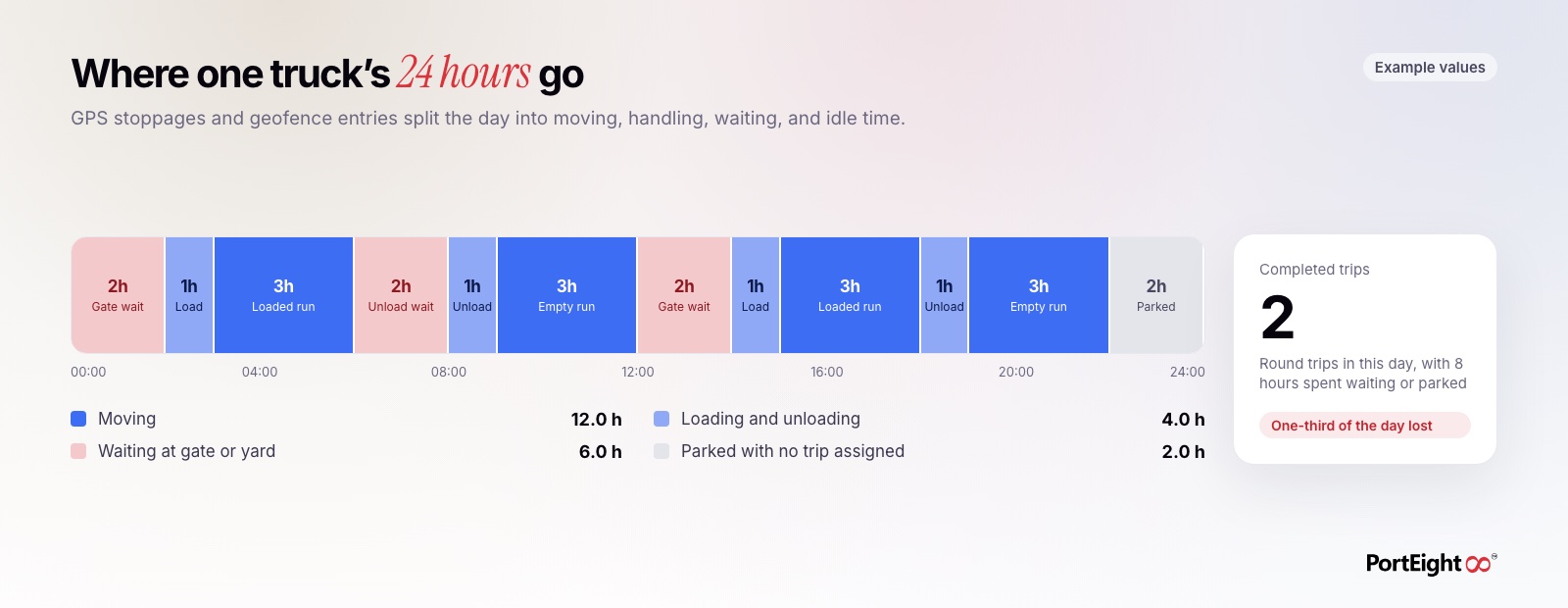
For industrial logistics, the most useful measure of utilization is simple: completed trips per vehicle per day. It is easy to explain to drivers, transporters, and finance teams, and it ties directly to tons moved. A truck that completes two round trips a day moves twice the material of a truck that completes one, for roughly the same fixed cost.
Other measures help explain the number. Kilometers per day shows how much a truck moves. Hours moving versus hours standing shows where time is lost. Payload per trip shows whether trucks are loaded to capacity. But trips per vehicle per day is the headline figure that plant heads and logistics managers should watch.
How to measure trips per vehicle per day
A trip should only count when it is complete: loaded at the origin, weighed, delivered, and weighed or confirmed at the destination. Counting gate entries or dispatch slips alone will overstate the number, because some trips are canceled, split, or never closed.
- Define a trip clearly: Agree on the start and end points, such as gate entry at the loading point and gate exit after unloading.
- Use system records, not registers: GPS geofence entries and weighbridge records give a timestamp for each stage without manual entry.
- Count by vehicle, not by transporter: A transporter total can hide a few trucks that are doing most of the work while others sit idle.
- Separate active days from calendar days: A truck under repair or without a driver should be tracked as unavailable, not as low utilization.
- Review by route: Trip counts on a 40 km quarry route and a 300 km plant-to-customer route cannot be compared directly.
Owned and hired fleets need different views
Many plants run a mix of their own trucks and trucks hired from transporters. Utilization matters for both, but for different reasons.
- Owned fleets: The company pays for the truck, the driver, and the finance cost whether the truck moves or not. Every idle hour is a direct cost, so trips per vehicle per day is a measure of return on the asset.
- Hired fleets paid per trip or per ton: Idle time is a cost to the transporter, but it still hurts the plant. Trucks held at your gate are trucks not available for your next load, and transporters may push for higher rates or detention charges.
- Hired fleets on monthly or fixed contracts: Here the plant pays for availability, so low utilization means paying for capacity you did not use.
Hired trucks are often harder to measure because they carry different GPS devices or none at all. Agreeing on a single tracking standard in the transporter contract makes the comparison fair and avoids disputes later.
Find where the hours go in the trip cycle
Once you can count trips, break each trip into stages and measure the hours spent in each one. The stage that loses the most time is where you will get the most improvement. In most plants, the largest losses are not on the road but at the ends of the trip: waiting for an order, waiting at the gate, and waiting at the weighbridge.
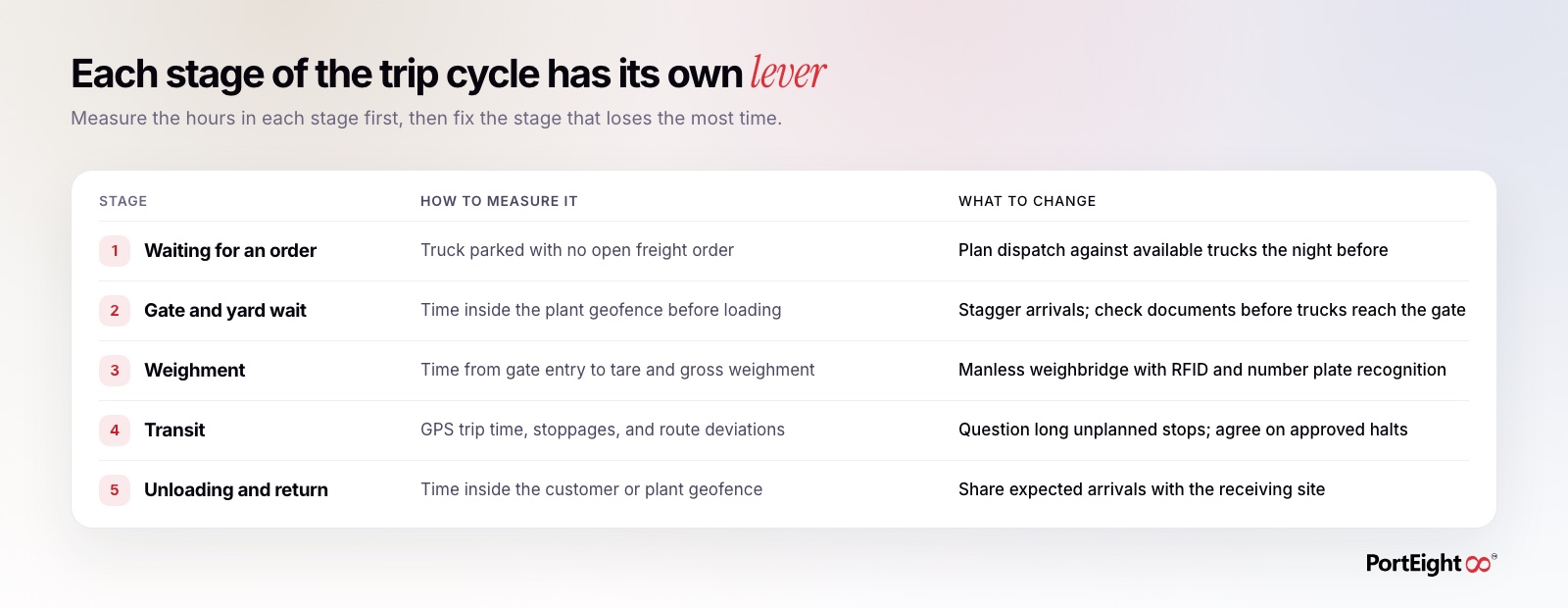
Geofences make this measurement practical. When the plant boundary, the loading bay, the weighbridge, and the unloading point each have their own geofence, entry and exit times give you the duration of every stage without anyone writing it down.
Practical ways to raise trips per vehicle per day
The changes that work best are usually operational, not technical. Data shows you where to act; the fix is a change in how trucks are planned, admitted, and handled.
- Plan dispatch the night before: Match the next day's orders against available trucks so no vehicle starts the day without an assignment.
- Stagger arrivals: When every truck arrives at the gate at 8 a.m., most of them will wait. Spread arrival times across the shift based on loading capacity.
- Clear documents before arrival: Check vehicle registration, fitness, permits, and driver licenses through Parivahan and Sarathi before the truck reaches the gate, so it is not held for paperwork.
- Speed up weighment: A manless weighbridge that identifies trucks by RFID or number plate recognition removes manual data entry from every weighment.
- Assign return loads where possible: An empty return run is a trip with no output. Where routes allow, pair outbound dispatch with inbound material.
- Fix the slowest unloading points: If one customer or stockyard consistently holds trucks longer, raise it with that site using the time records as evidence.
Build a weekly utilization review
Utilization improves when someone looks at it regularly and acts on what they find. A short weekly review is enough for most plants.
- List trips per vehicle per day by route for owned and hired trucks separately.
- Identify the vehicles with the lowest trip counts and check whether they were unavailable, unassigned, or delayed.
- Compare average hours spent at each stage of the trip cycle against the previous week.
- Pick the one stage with the largest delay and agree on a specific action and owner.
- Share transporter-level results with transporters so they can see where their trucks lose time.
Keep the review focused on causes rather than blame. A truck with one trip a day may have a slow driver, or it may have spent five hours waiting at your own weighbridge. The stage-by-stage data tells you which.
How PortEight helps
PortEight gives plant and logistics teams the records needed to measure and raise fleet utilization. GPS fleet tracking shows where every truck is, how far it has traveled, and where it stopped. Geofencing around gates, loading bays, weighbridges, and unloading points records the time each truck spends at every stage. Manless weighbridge automation with RFID and camera-based number plate recognition cuts manual work at weighment. Digital freight orders show which trucks have an assignment and which are waiting for one, and vehicle and driver documents can be checked through Parivahan and Sarathi before trucks arrive. The central dashboard brings trips, stages, and delays into one view, so your team can see trips per vehicle per day and focus on the stage that holds trucks the longest.
Take control of your logistics
operations in real time
Automate tracking, optimize movement, and eliminate delays across your entire supply chain.
Contact Us