
Night Trip Monitoring: Catching Route Deviations and Unapproved Stops Without a 24-Hour Control Room
Photo: Pinakpani, CC BY-SA 4.0, via Wikimedia Commons
Coal, cement, clinker, iron ore, and fly ash trucks often run through the night. Many plants dispatch late to clear the yard, and some cities restrict truck entry during the day. But the logistics desk usually works day shifts. By the time anyone looks at the screen the next morning, the truck has already arrived, or has not, and nobody knows what happened between dusk and dawn.
Why night trips need their own rules
Most night trips are uneventful. Drivers rest, eat, refuel, and reach the unloading point on time. The problem is that the few trips that go wrong at night tend to go wrong in ways that are expensive: material is unloaded or swapped at an unplanned stop, diesel is drained, or the truck runs a side job before delivering your load. With fewer people on the road and nobody at your desk, these trips are easier to hide.
A full 24-hour control room is one answer, but it is costly to staff, and operators watching hundreds of moving dots all night quickly stop noticing anything. A better approach for most plants is to define the rules in advance, let the system flag only the trips that break them, and split those flags into what needs a call tonight and what can wait until morning.
What can go wrong between dusk and dawn
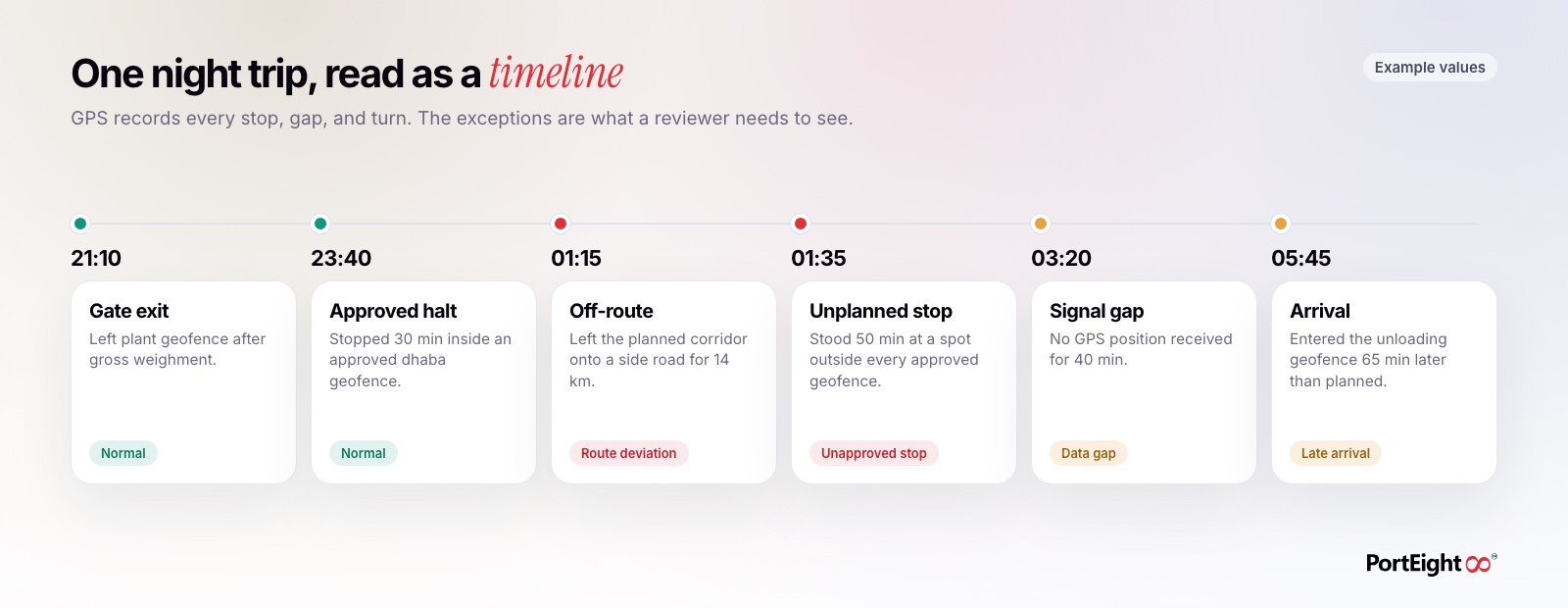
Night exceptions fall into a small number of types. Each one leaves a clear trace in GPS data, which is what makes them possible to monitor without watching the screen.
- Route deviation: The truck leaves the planned road for a side road, a village, or a yard that has nothing to do with the trip.
- Unapproved stops: The truck stands still for a long time at a spot that is not a known dhaba, fuel pump, or rest area.
- Signal gaps: The GPS device stops reporting for longer than normal, which can mean a dead zone, a power issue, or tampering.
- Unassigned movement: A truck that should be parked moves with no open trip against it.
- Late arrival: The truck reaches the unloading point well after the planned window, often the result of one of the above.
Set the ground rules before the trip starts
An alert is only as good as the rule behind it. If the system does not know what a normal trip looks like, every stop and every turn becomes noise. Spend the setup time on the routes you run most often.
- Fix the route for each lane: Agree on the road each regular lane should take, from plant gate to unloading point, including known diversions.
- Geofence approved halts: Draw geofences around the dhabas, fuel pumps, and parking areas drivers are allowed to use at night.
- Mark no-go zones: Geofence areas where your trucks should never stop, such as known scrap yards, illegal unloading spots, or locations linked to past losses.
- Set a planned arrival window: Use the distance and past trip times for each lane to set a realistic window, not a best-case time.
- Know your dead zones: Note stretches where mobile signal is weak, so short gaps there are not treated as tampering.
Share these rules with drivers and transporters before you start monitoring. When a driver knows which halts are approved, most of them will use those halts, and the exceptions that remain are more meaningful.
Decide which alerts need a person tonight
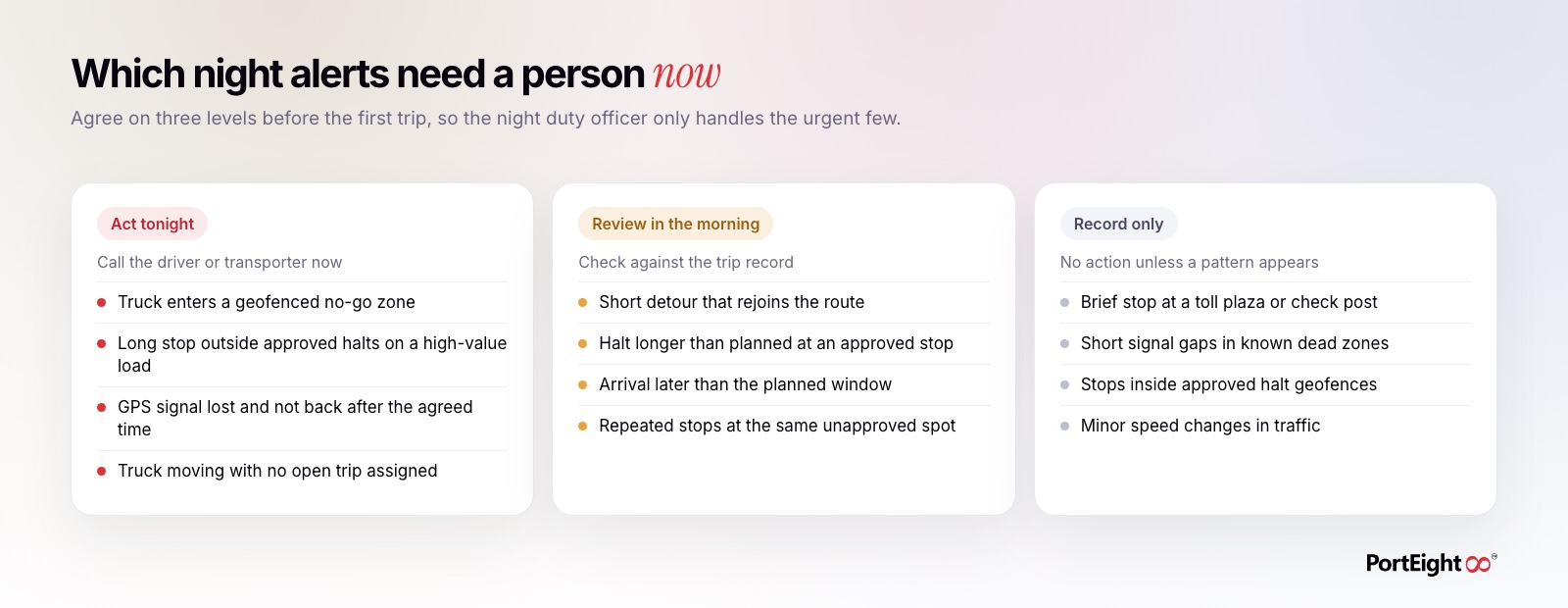
The main reason night monitoring fails is alert overload. If every stop triggers a message, the person on duty learns to ignore them all. Sort every alert type into one of three levels, and agree on the levels with your security and logistics heads.
- Act tonight: Situations where waiting until morning means the loss has already happened. A truck entering a no-go zone, a long stop outside approved halts on a high-value load, or a signal that does not come back after an agreed time.
- Review in the morning: Exceptions that need an explanation but not an immediate call, such as a short detour, a long halt at an approved stop, or a late arrival.
- Record only: Events that are normal on their own, such as brief stops at toll plazas or check posts, or short gaps in known dead zones. These matter only if they form a pattern.
The "act tonight" list should be short. A single duty officer, a security supervisor on call, or the transporter's own night contact can handle a few alerts a night. If the list grows, tighten the rules rather than adding people.
Run a short morning review
Most night exceptions are handled the next morning. The goal is to look at every flagged trip within a day, while drivers and transporters still remember what happened.
- Open the list of trips that ran between your night hours and filter to those with exceptions.
- For each trip, check the GPS route against the planned lane and look at every stop outside approved geofences.
- Compare the dispatch weight with the weight at the unloading point for trips with unplanned stops.
- Ask the driver or transporter about specific stops, with the time, location, and duration in hand.
- Record the outcome against the trip: explained, under review, or escalated.
Over a few weeks, patterns become clear. The same spot keeps appearing, the same driver keeps losing signal at the same place, or one transporter accounts for most of the late arrivals. These patterns matter more than any single trip.
Put the rules in the transporter contract
Monitoring works best when the transporter has agreed to it in writing. Disputes are much easier to settle when the rules were set before the trip, not after a loss.
- Name the approved routes and approved halts for each lane.
- State that a working GPS device must report for the full trip, and what happens if it does not.
- Agree on how unexplained stops, detours, and weight variances will be investigated and settled.
- Share the monitoring data with the transporter, so both sides look at the same record.
Transporters with good drivers often welcome this. Clear rules protect them from being blamed for losses they did not cause.
How PortEight helps
PortEight gives plants the trip data that night monitoring depends on. GPS fleet tracking records each truck's route, every stoppage with its location and duration, and gaps in reporting. Geofencing marks plant gates, loading and unloading points, approved halts, and no-go zones, so stops and entries outside them stand out. Digital freight orders link each truck to a planned trip, which makes movement with no open order easy to question. Manless weighbridge automation, using RFID and number plate recognition, records dispatch and receipt weights without manual entry, so weight checks on flagged trips are quick. The central dashboard brings routes, stoppages, geofence events, and weights into one view, so a small team can review the night's exceptions each morning and decide which ones need follow-up.
Take control of your logistics
operations in real time
Automate tracking, optimize movement, and eliminate delays across your entire supply chain.
Contact Us